
Shopify SEO is the practice of optimizing a Shopify store’s technical setup, on-page content, and off-page signals so search engines like Google can crawl, index, and rank its pages higher in organic search results. It combines three areas of work: technical SEO (site speed, crawlability, structured data), on-page SEO (product descriptions, meta titles, images), and off-page SEO (backlinks and brand mentions).
Shopify SEO works by aligning a store with how search engines discover and evaluate content. Search engines crawl a store’s pages through its XML sitemap and internal links, index the pages that pass quality and duplicate-content checks, then rank those pages based on relevance, page speed, and backlinks.
It offers 4 main benefits: increased organic traffic, lower paid advertising costs, stronger brand visibility, and long-term sales growth that doesn’t disappear when an ad budget stops. Store owners use it to get product pages, collection pages, and blog posts in front of shoppers who are actively searching for what they sell.
It breaks down into 3 main components: built-in platform features (sitemap, robots.txt, SSL, canonical tags), manual on-page work (keywords, product descriptions, images), and ongoing off-page work (content marketing and link building). This article covers each part, then gives a 4-week action plan for putting the strategy into practice.
How Shopify SEO Works
The process works through 3 stages: crawling, indexing, and ranking. Search engines send automated bots to discover a store’s pages, decide which pages qualify to appear in search results, then order those results by relevance and authority.
How Search Engine Bots Crawl Shopify Stores
Search engines crawl Shopify stores by following links from the XML sitemap and the site’s internal navigation. Shopify generates a sitemap automatically at yourstore.com/sitemap.xml, listing product pages, collection pages, blog posts, and standalone pages.
Crawlers also read the store’s robots.txt file, found at yourstore.com/robots.txt, to learn which sections to skip. Shopify’s default robots.txt blocks pages like /cart, /checkout, and /account, since these pages offer no value in search results.
A page with no internal links pointing to it is an orphan page. Orphan pages are harder for crawlers to find, so every product and collection page needs at least one link from the navigation menu, a related-products block, or a blog post.
How Google Indexes Shopify Store Pages
A crawled page can be indexed once Google determines that it’s accessible, useful, and suitable for inclusion in its search index. However, pages may be excluded from the index for several reasons, including duplicate content, a noindex robots meta tag, redirect issues, or a canonical tag that points to a different URL.
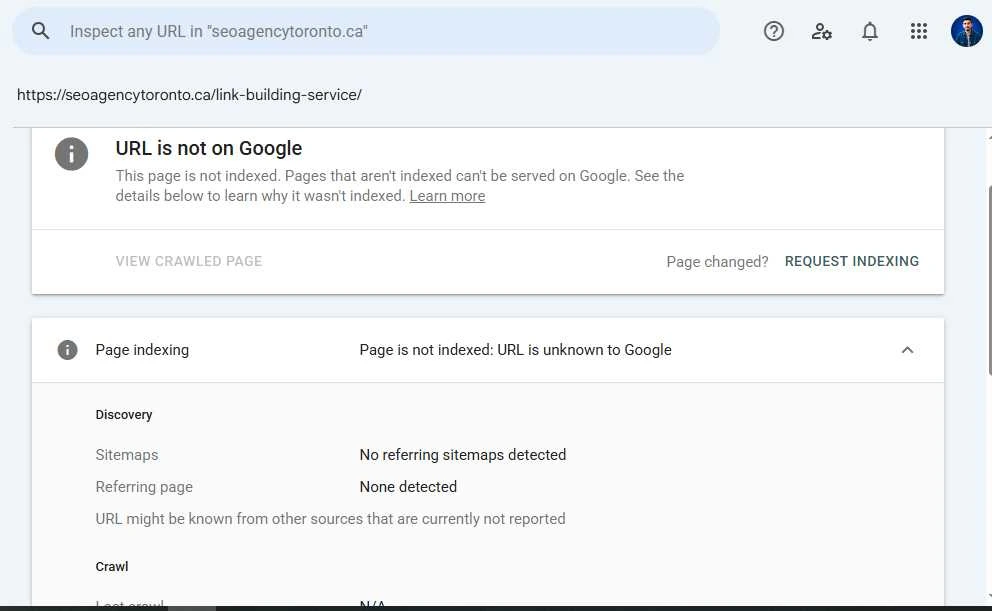
Shopify stores commonly face duplicate content because the same product can often be accessed through both a /products/ URL and a /collections/…/products/ URL. Shopify automatically adds canonical tags to indicate the preferred version for indexing, but store owners should verify the selected canonical URL and indexing status using the URL Inspection tool in Google Search Console rather than assuming everything is configured correctly.
How Shopify Pages Rank in Google
Google ranks Shopify pages by evaluating how well they satisfy a user’s search intent. The most important factors include content relevance and quality, the page’s technical health, internal linking, backlinks, and the overall authority of the website. Even if a page is indexed, it may rank poorly if it doesn’t provide enough value or lacks strong ranking signals.
Google also considers page experience as part of its ranking systems, including Core Web Vitals, which measure loading performance, interactivity, and visual stability. While Core Web Vitals alone won’t dramatically improve rankings, maintaining good scores can contribute to a better user experience. Shopify store owners can measure these metrics using Lighthouse in Chrome DevTools or PageSpeed Insights.
Key Shopify SEO Ranking Factors
There are several ranking factors that influence how Shopify pages rank in Google. The most important include high-quality, relevant content, keyword optimization, page speed and Core Web Vitals, mobile-friendliness, structured data (schema markup), internal linking, high-quality backlinks, and a secure HTTPS connection.
Rather than focusing on a single factor, optimize your store as a whole. Start by fixing technical issues that affect the entire website, such as poor Core Web Vitals, mobile usability problems, or indexing errors, then improve individual product pages with unique descriptions, optimized titles, and helpful content that matches search intent.
Why Shopify SEO is Important
Shopify SEO is important because it helps your store attract qualified organic traffic from people actively searching for the products you sell. Unlike paid advertising, where traffic stops as soon as your budget runs out, strong organic rankings can continue bringing visitors to your product, collection, and content pages over time, creating more opportunities to convert them into paying customers. This creates a more sustainable source of traffic, improves your store’s visibility in search results, and supports long-term ecommerce growth.
Increase Organic Traffic
Organic traffic rises when product and collection pages become visible for the exact terms shoppers search. Google Search still drives the majority of the world’s web traffic, so ranking on the first page for relevant keywords brings a steady stream of visitors without an ongoing ad spend.
Reduce Paid Advertising Costs
Paid advertising costs drop once organic rankings replace some or all of a store’s dependence on platforms like Google Ads, Facebook, and Instagram. Cost per click on paid platforms tends to rise as more advertisers compete for the same audience, while a page that ranks organically keeps bringing visitors at no additional cost per click.
Improve brand Visibility
Brand visibility improves when a store’s name and products appear across multiple stages of a shopper’s search journey, from informational searches to transactional product searches. Shoppers who repeatedly see a brand across search results and social media are more likely to recognize it, trust it, and choose it when they’re ready to make a purchase.
Drive Long-Term Sales
Long-term sales can grow because SEO is a compounding asset. Pages that rank well can continue attracting qualified organic traffic, while new content strengthens the authority of existing pages over time. As long as a page remains relevant and maintains its rankings, content published years ago can still attract potential customers and contribute to ongoing sales.
Shopify SEO Benefits
A well-optimized store gains 4 measurable benefits: better search visibility, higher conversion opportunities, improved user experience, and sustainable business growth.
Better Search Visibility
Better search visibility means a store’s pages appear more frequently and in higher positions for searches related to its products. Search visibility improves through a combination of technical fixes (crawlability, speed) and content fixes (keyword-optimized titles, descriptions, and headings).
Higher Conversion Opportunities
Higher conversion opportunities show up because organic search traffic tends to include buyers who are actively looking for a product, not passively scrolling. Transactional keywords, like “buy running shoes size 10,” attract visitors closer to a purchase decision than social media traffic typically does.
Improved User Experience
A fast, mobile-friendly, and easy-to-navigate store creates a better shopping experience for visitors. These improvements not only support SEO but also encourage users to stay longer, explore more products, and complete their purchases.
Sustainable Business Growth
Unlike paid advertising, organic visibility continues generating value over time. As more pages rank and your site’s authority grows, your store can attract consistent traffic and support long-term business growth with less reliance on paid campaigns.
Built-in Shopify SEO Features
Shopify includes 7 built-in SEO features that give every store a working technical foundation without custom development. These are: editable meta titles and descriptions, mobile-friendly themes, an automatic XML sitemap, robots.txt support, canonical URLs, SSL security, and structured data support.
Editable Meta Titles & Descriptions
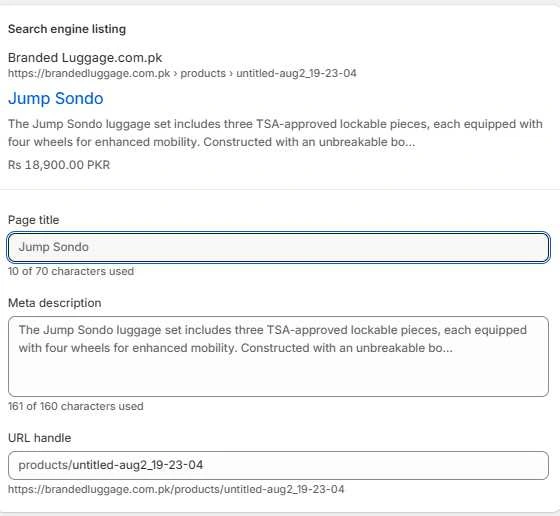
Shopify lets store owners edit the meta title and meta description for every product, collection, blog post, and page through the “Search engine listing preview” section of the page editor. Writing clear, keyword-focused titles and compelling meta descriptions helps search engines understand each page while encouraging more users to click your listing in search results. Keep titles concise and descriptive, and ensure every page has a unique meta title and description that accurately reflects its content.
Mobile-Friendly Themes
All themes available in the Shopify Theme Store are designed to work across mobile devices, tablets, and desktops. This is important because Google primarily uses the mobile version of a website for indexing and ranking. After installing or customizing a theme, test its performance with tools like Google Lighthouse or PageSpeed Insights to identify and fix any issues affecting mobile usability, page speed, or Core Web Vitals.
Automatic XML Sitemap
Shopify automatically generates and maintains an XML sitemap for every store, typically available at yourstore.com/sitemap.xml. This sitemap helps search engines discover and crawl your products, collections, blog posts, and other important pages more efficiently. After launching your Shopify store, submit your sitemap in Google Search Console by navigating to Indexing → Sitemaps. This helps Google discover new and updated pages faster, although it doesn’t guarantee immediate indexing.
Robots.txt Support
Every Shopify store includes a default robots.txt file that helps control how search engines crawl the site. By default, it prevents crawling of areas such as admin, checkout, cart, and customer account pages that shouldn’t appear in search results. Shopify also allows eligible stores to customize the robots.txt. liquid template when additional crawl control is needed.liquid template when additional crawl control is needed. This is useful for managing the crawling of filtered, faceted, or parameter-based URLs that could create duplicate or low-value pages.
Canonical URLs
Shopify adds canonical tags automatically to product pages that are accessible through more than one URL path. This prevents search engines from treating the /products/ version and the /collections/…/product version as 2 separate, competing pages.
SSL Security
Every Shopify store includes a free SSL certificate by default, ensuring that all pages are served over HTTPS. SSL encrypts the data exchanged between your website and visitors, protecting sensitive information such as login credentials, personal details, and payment information. HTTPS is also a confirmed Google ranking signal and helps build user trust by displaying a secure connection in the browser.
Structured Data Support
Most Shopify themes include basic structured data (schema markup) for products, breadcrumbs, and organization information by default. Structured data helps search engines better understand your store’s content and can improve how pages appear in search results. If you need additional schema types, such as Review, FAQ, or Article schema, you can implement them using a dedicated Shopify app or by customizing your theme code, since the default markup doesn’t include every schema type.
Common Shopify SEO Myths
4 Shopify SEO myths lead store owners to waste time or make avoidable mistakes.
Shopify Stores Can’t Rank on Google
No, this is false. It’s one of the most common misconceptions about Shopify SEO.
In reality, Shopify stores regularly rank on the first page of Google across a wide range of ecommerce industries, from small businesses to enterprise retailers with hundreds of thousands of product pages.
Shopify provides a strong technical SEO foundation with built-in features such as SSL certificates, XML sitemaps, canonical URLs, mobile-friendly themes, and clean site architecture. However, these features alone don’t guarantee high rankings.
Like any other ecommerce platform, success in Google Search depends on publishing high-quality content, optimizing on-page and technical SEO, improving site speed and user experience, earning relevant backlinks, and building topical authority over time.
SEO Apps Automatically Fix Everything
No, SEO apps alone won’t fix your SEO. While SEO apps can automate tasks such as generating schema markup, optimizing image alt text, identifying technical issues, and managing redirects, they cannot replace a comprehensive SEO strategy.
They won’t create high-quality, search-intent-driven content, earn authoritative backlinks, improve your site’s topical authority, or optimize the overall user experience. Those require strategic planning and ongoing effort.
Think of SEO apps as tools that make certain tasks faster and easier, not as a substitute for a complete SEO strategy.
More Keywords Mean Better Rankings
No, adding more keywords doesn’t guarantee better rankings. In fact, forcing too many keyword variations into a page can make the content difficult to read and may be interpreted as keyword stuffing. Instead, focus on one primary keyword and naturally include closely related terms where they fit the context. Writing for users first while maintaining topical relevance is a far more effective long-term strategy.
Shopify SEO Is One-Time Work
No, Shopify SEO is not a one-time task. Search trends change, competitors optimize their websites, Google continually updates its ranking systems, and ecommerce stores evolve as products, collections, and content are added or removed.
To maintain and improve organic rankings, you need ongoing SEO efforts, including content updates, technical SEO audits, performance optimization, internal linking improvements, backlink acquisition, and regular reviews of your overall SEO strategy.
Shopify SEO for Beginners
A beginner can start improving Shopify SEO through 7 steps: keyword research, optimizing product pages, optimizing collection pages, creating helpful blog content, improving internal linking, optimizing images, and monitoring performance in Google Search Console.
Keyword Research
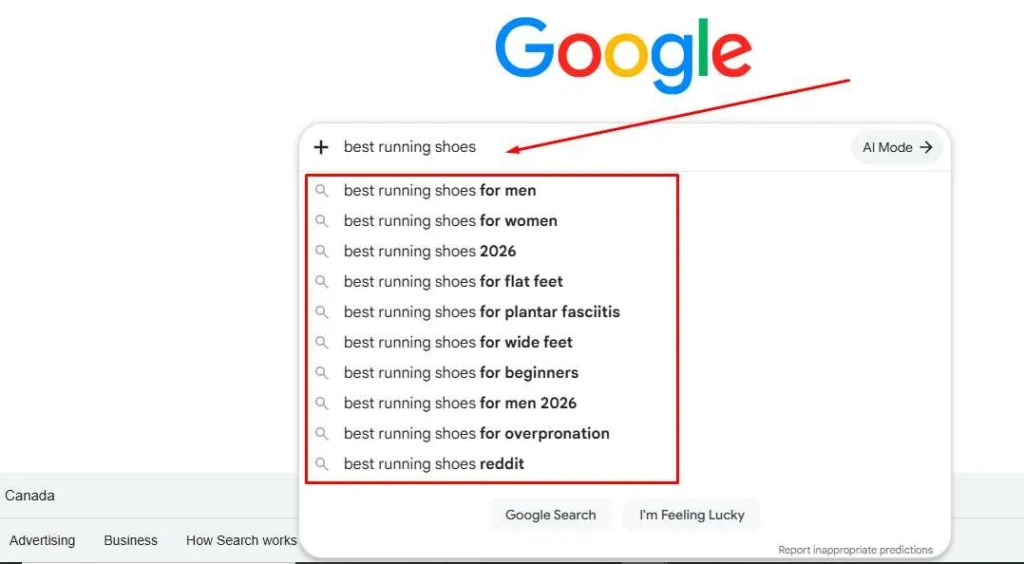
Keyword research begins by identifying the words and phrases potential customers use when searching for products like yours. Start with Google’s autocomplete suggestions, the People Also Ask section, and free and paid tools such as Google Keyword Planner, SemRush, Ahrefs, and Moz to build an initial list of relevant keywords.
Once you have a list, group keywords by search intent. Transactional keywords are best suited for product pages, commercial keywords work well on collection pages, and informational keywords are ideal for blog content. Rather than targeting only high-volume keywords, prioritize terms that are relevant to your products and realistic to rank for.
Optimize Product Pages
Optimize every product page by adding the primary keyword naturally in the page title tag, meta title tags, meta description tag, heading, image alt text, and product description. Write unique descriptions that clearly explain the product’s features, benefits, and use cases instead of relying on manufacturer-provided content, which can create duplicate content across multiple websites.
Optimize Collection Pages
Collection pages often contain very little unique content, making them harder for search engines to understand. Add a concise, keyword-focused description that explains what the collection offers and helps shoppers navigate the category. Use broader keywords for main collections and more specific terms for sub-collections to match different stages of the buying journey.
Create Helpful Blog Content
Create blog content around the informational keywords gathered during keyword research, like “how to choose running shoes for flat feet.” Cover each topic in depth using clear headings, practical advice, and supporting examples. Where relevant, naturally link to related products or collections to help readers continue their journey while strengthening your internal linking structure.
Improve Internal Linking
Improve internal linking by connecting the homepage to collection pages, collection pages to subcategories, and subcategories to individual product pages wherever it adds value. A well-planned internal linking structure helps search engines discover pages more efficiently while making it easier for shoppers to navigate your store.
Optimize Images
Optimize images by compressing file sizes, using descriptive file names like “red-leather-handbag.jpg” instead of “IMG4821.jpg,” and writing alt text that describes what the image shows. Whenever possible, use modern formats like WebP, since WebP produces files 25% to 34% smaller (roughly 0.25- 0.34 MB smaller per megabyte) than JPEG at the same visual quality.
Monitor Performance in Google Search Console
Google Search Console helps you monitor how your Shopify store performs in organic search. Regularly review the Pages report to identify indexing issues, the Performance report to track clicks, impressions, and keyword rankings, and the Core Web Vitals report to monitor page experience and loading performance. Check these reports regularly, especially after publishing new content, updating your theme, or making significant changes to your store.
Shopify SEO Action Plan
A structured Shopify SEO campaign can be organized into a 4-week action plan: technical SEO in week 1, on-page optimization in week 2, content creation in week 3, and link building with performance tracking in week 4.
Week 1 – Technical SEO
Complete these technical SEO tasks in the first week: connect a custom domain, confirm the SSL certificate is active, submit the sitemap.xml file to Google Search Console, and run a Lighthouse audit or PageSpeed Insights to check Core Web Vitals scores. Check for crawl errors, broken links, redirect issues, duplicate content, and robots.txt settings that could prevent important pages from being crawled or indexed.
Week 2 – On-Page Optimization
Complete these on-page tasks in the second week: finish keyword research, rewrite product titles and meta descriptions with target keywords, add unique product descriptions, and optimize image alt text across the catalog while ensuring every page provides unique and helpful information. If your theme doesn’t include structured data, add the appropriate schema markup for important page types.
Week 3 – Content Creation
Complete these content tasks in the third week: Create content that answers your customers’ questions before they make a purchase. Publish helpful blog posts targeting informational search intent, expand collection page descriptions where needed, and naturally link relevant articles to products and collections. Focus each piece of content on a closely related topic or keyword cluster to build topical authority over time.
Week 4 – Link Building & Performance Tracking
Strengthen your store’s authority by earning relevant backlinks through partnerships, digital PR, guest content, or reputable business directories where appropriate. At the same time, monitor your store’s performance in Google Search Console and Google Analytics 4 by tracking organic traffic, keyword performance, indexing status, and Core Web Vitals. Use these insights to identify new optimization opportunities and plan the next month’s SEO priorities.
Frequently Asked Questions
What is Shopify SEO?
Shopify SEO is the process of optimizing a Shopify store’s technical setup, content, and site structure to improve its visibility in search engines and attract more organic traffic. It includes technical SEO, on-page SEO, content optimization, and off-page link building.
Is Shopify good for SEO?
Yes, Shopify is a good platform for SEO. It includes an automatic sitemap, automatic robots.txt generation, free SSL certificates, canonical tags, and editable meta titles and descriptions by default. Its main limitations are a fixed URL structure that adds /products or /collections to every URL, and basic structured data that doesn’t cover every schema type.
How long does Shopify SEO take?
It typically takes 3 to 12 months to produce measurable ranking improvements, depending on the store’s age, competition, website authority, and the consistency of SEO efforts. New stores usually take longer because they have little content and few backlinks.
Do I need Shopify SEO apps?
No, Shopify SEO apps aren’t required, but they can save time. Apps can automate tasks like generating alt text, building schema markup, or auditing pages for errors. A store owner can complete most core SEO tasks manually using Shopify’s built-in features, Google Search Console, and Google Analytics.
Can I do Shopify SEO myself?
Yes, a store owner can do Shopify SEO without hiring an agency. The main requirements are keyword research, unique product content, basic technical checks through Google Search Console, and a consistent content and link-building schedule. However, stores with complex technical issues, large product catalogs, or website migrations may benefit from partnering with a Shopify SEO agency
What is the biggest Shopify SEO mistake?
The biggest Shopify SEO mistake is publishing manufacturer-supplied product descriptions without rewriting them, creating duplicate content across multiple ecommerce websites. Other common mistakes include missing image alt text, thin or empty collection page descriptions, poor internal linking, and treating SEO as a one-time setup instead of an ongoing process.